


GPS Tracker: Find Phone
4.246.00 Reviews
App Specs
- Version
- 1.1.4
- Updated On
- License
- Free
- Downloads
- 5,000,000+
- Developer
- Mitra MT
- Categories
- Maps & Navigation
- Platform
- Android
Screenshots
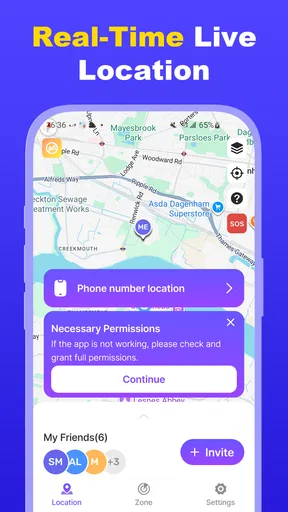
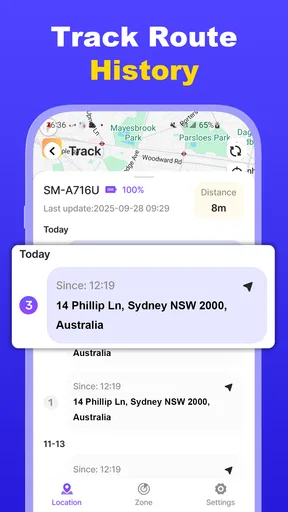
 Analysis by AppCompare
Before relying on any location app for a household routine, I’d first agree with everyone involved on what is being shared and why. That conversation matters more than a map pin: location tools work best as a practical way to meet up or recover a misplaced device, not as a substitute for trust or direct communication.
A shared phone is not automatically a shared account
For a family or group, the useful question is not simply whether a device can be located, but who will be able to see its location and when. I’d set up the app with the device owner present, explain what the location feature is for, and check that each person understands how sharing works before making it part of a routine. That avoids the awkward surprise of someone discovering they are being tracked without having agreed to it.
Shared devices need a little extra thought. If a phone is passed between family members, a location pin may identify the phone rather than the person currently carrying it. I would treat that distinction as important, especially when plans change or a device is left behind. A quick message or call is a better way to confirm who has the phone than assuming the map tells the whole story.
Make location sharing serve a specific plan
A realistic use is coordinating a pickup at a crowded place. Instead of repeatedly texting directions, the people involved can use location sharing to help find one another, then switch back to ordinary messages once they meet. For this sort of short task, agree on the purpose in advance and avoid treating a location update as proof that someone is safe, available, or ready to be picked up.
For a lost phone, I’d start with the simplest recovery steps: check nearby rooms and the last place it was used, then use the tracker if the device is still reachable. If the phone is somewhere public or unfamiliar, a location result can help narrow the search, but it does not replace sensible precautions. Don’t confront a stranger or enter a risky place just because a map suggests the phone is there.
That distinction also helps set expectations. A GPS tracker can be useful for finding a device or coordinating with a willing participant, but it cannot guarantee that a person will answer, that a phone is being carried, or that every location update will be exact. I’d keep a backup plan—such as agreeing on a meeting point or calling the person—rather than making the app the only way to coordinate.
Who may prefer a different approach
This kind of tool makes most sense for people who want a straightforward location-sharing option alongside a phone-finding purpose. It is less suitable for anyone who wants a complete family-safety system with detailed controls, or for a household that has not agreed on sharing boundaries. If your main need is only to locate your own device, the built-in find-my-device service on your phone may be enough and may avoid setting up another app.
Worth Reading Before You Choose

EA SPORTS FC Mobile 26 Is a Bigger Football Game, but It Takes Time

Flipboard Shows What News Apps Must Do Beyond the Feed

Switching to Android Auto Means Rethinking Your Driving Routine

Google Calendar Makes a Crowded Week Easier to Manage

Ludo King Makes the Most of the Minutes Between Plans

Baby Panda World Brings Quick Play to Modern Phones, but Its Game Library Feels Busy
Compared with the usual alternatives, a dedicated tracker can put device recovery and shared location in one place, while a messaging app may be easier for occasional, conversation-based location sharing. Built-in phone-finding tools are often the more direct choice for a single lost handset. Which option is better depends on the task: finding your own phone, meeting someone, and coordinating a household are related needs, but they are not interchangeable.
I would also check the payment details before making it part of a routine. The app is free to install, while optional in-app purchases are listed from $2.49 to $9.99 per item. I’d avoid paying until I knew which part of the experience I actually needed; a free download does not mean every available option is free.
As an app in the maps and navigation category, GPS Tracker: Find Phone is aimed at a practical everyday problem rather than route planning. Mitra MT is the developer. Its average rating is 3.9 from around 3,100 ratings, and it has over 1 million installs. Those figures suggest it has found an audience, but they do not tell me whether its sharing model fits a particular family, so I’d judge that by trying it with clear expectations.
The app is rated for Everyone and was released on February 6, 2026. Version 1.0.7 is the current version, and it requires Android 7.0 or later. Those details are worth checking against the devices in your household before asking everyone to rely on the same setup; an older phone that cannot run the app can complicate a plan that otherwise sounds simple.
One useful habit is to decide in advance what each person should do if the app does not resolve a situation. For a meet-up, that might mean waiting at a named entrance rather than wandering around while watching a map. For a missing phone, it might mean calling it first and checking familiar places before broadening the search. These small agreements keep the technology in its proper role: helpful support, not the whole plan.
If you are setting this up for a younger family member, involve them in the decision and explain what the feature is meant to solve. A location-sharing tool can support coordination, but using it secretly or as a constant check-in can damage trust. Age suitability on an app label does not answer whether a particular household’s sharing arrangement is appropriate; that depends on the people involved and their expectations.
I’d also keep account access and device ownership clear. Each person should know which account is being used and who can view shared information. If a phone changes hands, or a family member stops participating, revisit the setup rather than assuming the old arrangement still makes sense. That is a modest bit of housekeeping, but it prevents a shared tool from quietly outliving the reason it was installed.
For occasional coordination, I would not ask everyone to keep a location app open all day. Use sharing when it solves a concrete problem, then return to normal communication. That approach is easier to explain, gives people room for privacy, and makes it less likely that a stale or misunderstood location will be treated as current information.
There is also a difference between a phone being missing and a person being unreachable. If the device has been left at home, its position says little about where its owner is. If someone is late, a direct call or message is usually more informative than repeatedly refreshing a map. Thinking through these cases beforehand is a simple way to avoid reading too much into a location display.
When evaluating whether to keep the app, I’d judge it by a few ordinary tests rather than by a dramatic emergency scenario: can the people who need it understand the sharing arrangement, does it fit the devices they use, and does it help with the specific task they agreed on? If the answer is no, a built-in phone-finding feature or a quick message may be the more comfortable choice.
For a household that wants a simple way to coordinate around devices and consenting family members, this can be worth considering. For people who expect extensive parental controls, guaranteed tracking, or a replacement for conversation, I would look elsewhere or use a more suitable tool. The best setup is the one everyone understands and accepts, not the one that collects the most location information.
If you've ever experienced that heart-stopping moment of realizing your phone is missing, you'll appreciate the magic of the GPS Tracker: Find Phone app. This nifty tool is not just about finding your misplaced gadget; it’s like having a personal detective right in your pocket. Let me walk you through my experience with this app.
Getting Started: Ease of Use
First things first, downloading the app is a breeze. Available on both Android and iOS, the installation is quick and straightforward. Once you open it, you're greeted with a clean, user-friendly interface. I love how intuitive it is; even if you're not tech-savvy, you'll find your way around without any hiccups.
Setting up the app involves a few simple steps. You need to grant the necessary permissions, like location access, which is crucial for the app to work its magic. Don't worry; the app takes privacy seriously, ensuring your data is secure.
Features That Stand Out
The app's main feature is tracking your phone, and it does this exceptionally well. Whether your phone is buried in the couch cushions or left at a friend’s place, the app pinpoints its location with surprising accuracy. I tested it several times, and each time, the location was spot on. It’s like having a GPS tracker dedicated just for your phone.
Another cool feature is the ability to make your phone ring, even if it's on silent. This is an absolute lifesaver if you're like me and often leave your phone on mute. Just a quick tap, and you can follow the sound to your device's hiding spot.
But wait, there's more! The app also offers real-time location sharing, which is perfect for keeping tabs on family members or friends. I used this feature when coordinating a meeting in a busy area, and it was incredibly helpful. You can share your location for a set period, giving peace of mind to anyone waiting for you.
Performance and Reliability
In terms of performance, the app is rock solid. It runs smoothly without draining your battery, which is a huge plus. I’ve had apps before that turned my phone into a pocket heater, but not this one. It’s efficient and doesn’t hog your phone's resources.
Reliability is key for any tracking app, and I found the app to be consistently dependable. Each time I tested it, the app delivered accurate results without any lag. It’s something you can genuinely rely on, especially in those "where the heck is my phone?" moments.
Additional Perks
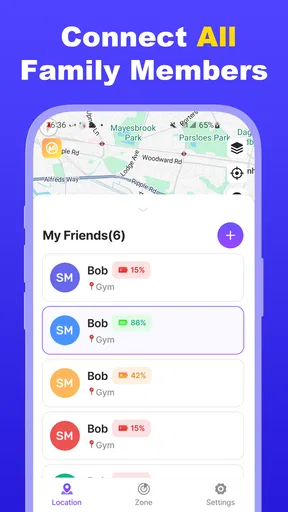
One of the nice touches is the app's ability to track multiple devices. If you’re managing gadgets for your family, this is incredibly convenient. You can keep an eye on everyone’s devices from a single app, which is both practical and efficient.
The app also integrates well with other services, enhancing its functionality. For instance, you can sync it with your smartwatch, making it even easier to locate your phone when you're on the go. It’s these small details that make the app stand out.
Final Thoughts
Overall, this GPS Tracker: Find Phone is a must-have app for anyone who values their sanity. It’s more than just a nifty tool; it’s a peace of mind provider. Whether you're prone to misplacing your phone or just want to keep tabs on loved ones, this app is a game-changer.
If you’re ready to say goodbye to the panic of a lost phone, I highly recommend giving this app a try. It’s like having a digital guardian angel for your device. So go ahead, check it out on your app store, and experience the relief of knowing your phone is just a tap away.
Pros
- Accurate real-time location tracking.
- User-friendly interface for easy navigation.
- Battery-friendly with efficient power use.
- Supports multiple devices on one account.
- Customizable alerts for location updates.
Cons
- Requires internet connection to function.
- Limited features in the free version.
- Occasional location update delays.
- Some features require in-app purchases.
- Privacy concerns with constant tracking.
FAQs for GPS Tracker: Find Phone
What features does the GPS Tracker: Find Phone app offer?
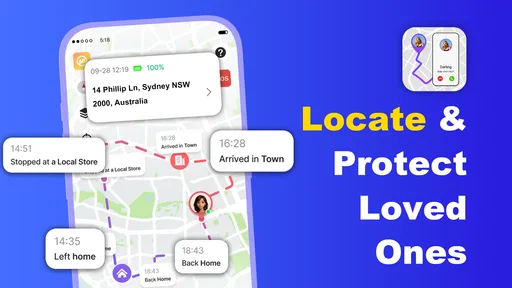
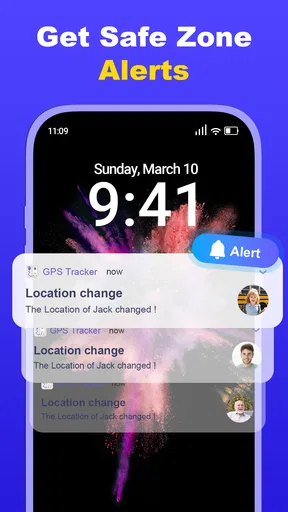
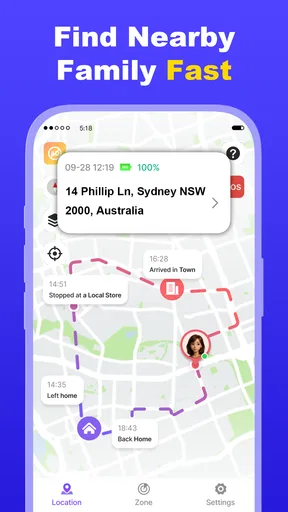
The GPS Tracker: Find Phone app provides real-time location tracking, geofencing, location history, and SOS alerts. It allows you to track multiple devices simultaneously and set up safe zones for notifications when a device enters or leaves these areas. The app also includes battery monitoring to ensure devices are charged.
Is GPS Tracker: Find Phone compatible with both Android and iOS devices?
Yes, the GPS Tracker: Find Phone app is compatible with both Android and iOS platforms. It offers seamless cross-platform functionality, allowing you to track devices regardless of the operating system. This makes it a versatile choice for families or groups with mixed device types.
How does the app ensure user privacy and data security?
The GPS Tracker: Find Phone app prioritizes user privacy and data security through encrypted data transmission and secure servers. Users have control over who can access their location information, and the app complies with GDPR regulations to safeguard personal data. It's essential to review the app's privacy policy for detailed information.
Does the app require a subscription or in-app purchases?
The GPS Tracker: Find Phone app offers both free and premium versions. The free version includes basic tracking features, while the premium version, which requires a subscription, provides advanced functionalities like geofencing and detailed location history. Users can choose according to their needs and budget.
Can the app be used internationally, and are there any limitations?
Yes, the GPS Tracker: Find Phone app can be used internationally, making it ideal for travel. However, users should be aware of potential data roaming charges and ensure that their mobile plan supports international data usage. The app’s functionality may also depend on the availability of internet connectivity.


